By: Dipin Sehdev
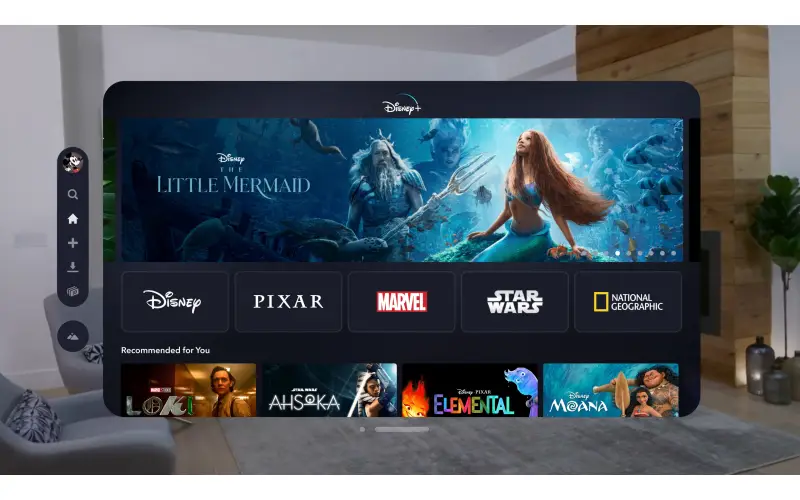
Streaming has long promised the best of both worlds—convenience and quality—but anyone who has invested in a high-end home theater setup knows that the reality often falls short. A perfect case study in that tension comes from Disney+, where Apple TV 4K users have been reporting ongoing issues with Dolby Vision playback and frame rate matching. The problem has simmered for months, and while Disney finally acknowledged it publicly, there’s still no timeline for a fix.
For Apple TV owners who take picture quality seriously, this is more than a minor inconvenience—it’s a break in the very experience they invested in when they bought into the premium ecosystem of Dolby Vision, HDR10, and seamless frame rate switching.
The Problem: Disney+ on Apple TV Fails to Deliver Dolby Vision Properly
The issue first gained traction on enthusiast forums and social platforms earlier this year. Users noticed that when watching Disney+ content on the Apple TV 4K, Dolby Vision wasn’t always activating properly. In some cases, the picture defaulted to HDR10 or even SDR, depending on the title. Others reported that the app ignored Apple TV’s frame rate matching settings, resulting in stutter or judder during playback—an especially frustrating outcome for fans of cinematic content who expect buttery-smooth motion.
This is not a universal problem across streaming apps. Apple TV’s hardware supports Dolby Vision and frame rate matching at the system level, and apps like Netflix, Apple TV+, and HBO Max (now Max) implement these features consistently. The fact that Disney+ is lagging behind suggests the issue lies with the app itself, not Apple’s hardware or tvOS.
Disney Finally Responds
For months, users tagged Disney+ and Apple on social media with little acknowledgement. The silence left many to speculate: was Disney ignoring the problem, or did it not see Apple TV as a priority platform?
That changed when @DisneyPlusHelp, the official Disney+ support account on X (formerly Twitter), finally replied directly to a user report. The statement read:
“Hello! Thank you for reaching out and letting us know that you are not able to view Dolby Vision on the Disney+ app with your Apple TV. The good news is that our team knows about this particular issue and is working on a solution as we speak. If there’s anything else we can do for you as we continue to work on a solution, please let us know!”
It’s a polite acknowledgment, but also a carefully worded one. Disney admitted that the problem exists and confirmed that engineers are working on it. But the statement falls short of offering specifics—no explanation of what went wrong, no estimated timeline for a fix, and no clarity on whether the problem affects only certain Apple TV models or configurations.

Why This Matters to Apple TV Users
For casual viewers watching Disney+ on a budget TV, this might not sound like a big deal. But for Apple TV 4K owners—who are often home theater enthusiasts with 4K OLED displays, soundbars, or full surround sound systems—Dolby Vision and frame rate matching are critical.
Dolby Vision is a dynamic HDR format that adjusts brightness, color, and contrast on a scene-by-scene basis, allowing filmmakers’ creative intent to shine through with far greater fidelity than HDR10. Without Dolby Vision, titles like Avengers: Endgame, Avatar: The Way of Water, or the Star Wars series look notably flatter and less vibrant.
Frame rate matching is equally important. Apple TV is designed to switch between 24fps, 50fps, and 60fps depending on the source material, ensuring smooth motion and eliminating judder. Disney+ ignoring these settings means movies shot at 24fps—most major blockbusters—may not play back as smoothly as intended. For enthusiasts, it’s a dealbreaker.
A Recurring Problem with Disney+ on Apple TV
This isn’t the first time Disney+ has struggled with Apple TV integration. Since its launch in 2019, users have pointed out inconsistencies in how the app handles HDR, Dolby Atmos, and even subtitle placement. By comparison, Netflix, Apple TV+, and Prime Video generally provide more reliable playback experiences on Apple TV 4K.
Part of the challenge may be Disney’s unique distribution architecture. Disney+ uses its own encoding and delivery pipeline, which can sometimes conflict with Apple’s strict implementation of system-level features. While Apple insists on standardized APIs for features like frame rate and HDR matching, Disney+ has historically rolled out its own solutions on different platforms at different times.
For instance, Dolby Atmos didn’t arrive on Disney+ for Apple TV until months after it was available on other devices. This pattern suggests that Disney prioritizes its app roadmap differently across ecosystems, and Apple TV—despite its popularity among enthusiasts—may not always be first in line.
Why Enthusiasts Care: The Home Theater Factor
The Apple TV 4K isn’t just another streaming box. It has become the de facto choice for serious home theater users who value consistent support for high-bitrate streams, advanced audio formats, and premium HDR. Unlike cheaper devices like Roku sticks or Fire TV models, Apple TV integrates seamlessly with HDMI-CEC, AirPlay, and HomeKit, making it the centerpiece of many modern setups.
Disney+ occupies a unique position in this equation. It’s one of the few platforms where you can stream nearly the entire Marvel Cinematic Universe, Pixar films, and every Star Wars installment in 4K HDR with Dolby Atmos. For many households, Disney+ is the crown jewel of their streaming library. When the app underdelivers on Apple TV, it’s not just an inconvenience—it undermines the very reason enthusiasts pay for both the subscription and the hardware.
The Silence Around a Fix
Disney’s acknowledgment on X is a step forward, but it’s also vague. Without a timeline, users are left in limbo. Will this be fixed in the next app update? Or is it a deeper compatibility issue that could drag on for months?
The lack of transparency is especially frustrating given Disney’s stature. This is not a niche streaming service with limited resources—it’s one of the largest media companies in the world. If smaller services like Apple TV+ and Criterion Channel can implement Dolby Vision and frame rate matching reliably, why can’t Disney?
Some enthusiasts speculate that the issue may be tied to Disney’s encoding pipeline, which has to balance a massive global user base across smart TVs, game consoles, mobile devices, and streaming sticks. Apple TV may represent only a fraction of that ecosystem, and fixing its issues could require changes that ripple across platforms. Still, Disney has not provided any technical details.
Apple’s Role in the Equation
While most of the blame lies with Disney’s app, Apple isn’t entirely off the hook. Apple has positioned the Apple TV 4K as the best-in-class streaming box, and its marketing emphasizes Dolby Vision and seamless frame rate handling. When a major app fails to deliver those features, the user experience falls short of that promise.
Apple could put more pressure on partners like Disney to maintain parity with other apps, especially given Apple’s reputation for tightly controlled software experiences. Instead, the lack of public comment from Apple leaves enthusiasts wondering whether the company is content to let third-party apps cut corners.
What Users Can Do in the Meantime
For now, Apple TV owners who want the best possible Disney+ experience have limited options:
-
Check other devices: Some users report that Dolby Vision and proper frame rate matching work more consistently on devices like LG and Samsung smart TVs, Roku Ultra, or PlayStation 5.
-
Force HDR output: By disabling “Match Dynamic Range” in Apple TV settings and forcing HDR output, users can at least get consistent HDR10 playback. However, this sacrifices the benefits of Dolby Vision and proper SDR handling.
-
Stay updated: Disney frequently pushes updates to its apps without detailed changelogs. Keeping the Disney+ app updated is the only way to catch a potential fix early.
Looking Ahead
The Disney+ issue highlights a broader truth about the streaming ecosystem: even as hardware and software advance, consistency across platforms remains elusive. Enthusiasts may invest thousands in displays, receivers, and speakers, but they’re still at the mercy of app developers who may or may not prioritize their platform of choice.
Disney has at least acknowledged the problem, which is more than many frustrated users expected. But without a clear roadmap for a fix, the frustration remains. Until then, Apple TV owners will have to accept a compromised Disney+ experience—ironic, given that Disney+ was one of the first major streaming services to tout 4K HDR and Dolby Atmos at no extra cost.
Final Thoughts
Streaming is supposed to make things simpler, but the Disney+ Dolby Vision and frame rate matching issues on Apple TV underline just how complicated it can be when content delivery doesn’t align with hardware capabilities. Apple TV remains the gold standard for premium playback, but when Disney+—arguably one of the most important apps on the platform—fails to deliver, it undermines confidence in both the service and the device.
For now, Disney has admitted there’s a problem. The next step is to actually fix it—and to communicate clearly with the users who are paying for a premium experience and not getting it. Until then, Apple TV owners may find themselves looking elsewhere for their Disney+ fix, or worse, questioning whether their subscription is worth keeping active.