By: Dipin Sehdev
Apple’s annual iOS refresh always brings with it sweeping changes across its ecosystem of apps. With iOS 26, Apple has turned much of its attention to Apple Music, rolling out one of the most significant updates to the streaming platform in years. Alongside the broader system-wide Liquid Glass redesign, Apple Music now has tools that make music playback more dynamic, more personal, and even more global. iOS26 is out today!
From AutoMix, Apple’s DJ-like song transition system, to Lyric Translation and Pronunciation Guides that bridge language barriers, Apple Music is now as much about discovery and participation as it is about listening. Here’s a deep dive into everything that’s new, how to update your iPhone, and which devices are eligible for iOS 26.
AutoMix: Apple Music’s DJ-Inspired Upgrade
Perhaps the most talked-about new feature in iOS 26’s Apple Music is AutoMix. While Apple has long offered crossfade—a simple overlap of two tracks—AutoMix takes this much further.
Instead of merely fading one track into another, AutoMix uses time stretching and beat matching to analyze both the outgoing and incoming songs. It then chooses the perfect transition moment, matching tempo and key so seamlessly that the listener barely notices the shift.
Apple describes the experience as similar to having a DJ constantly guiding your playlist: the energy flows, the beats line up, and transitions feel natural. This is particularly impactful for genres like EDM, pop, and hip-hop, where rhythm is central.
That said, AutoMix isn’t flawless yet. It can occasionally struggle with genres like classical or jazz, where tempo shifts and time signatures vary more widely. Apple has acknowledged that the feature is a work in progress, and future iOS 26 point releases are expected to refine it further.
How to enable AutoMix:
After installing iOS 26, Apple Music will prompt you to try AutoMix. You can toggle it on or off in Settings > Music > Playback. Note that AutoMix requires an active Apple Music subscription but is not tied to Apple Intelligence (Apple’s AI suite).
Lyric Translation and Pronunciation: Breaking Language Barriers
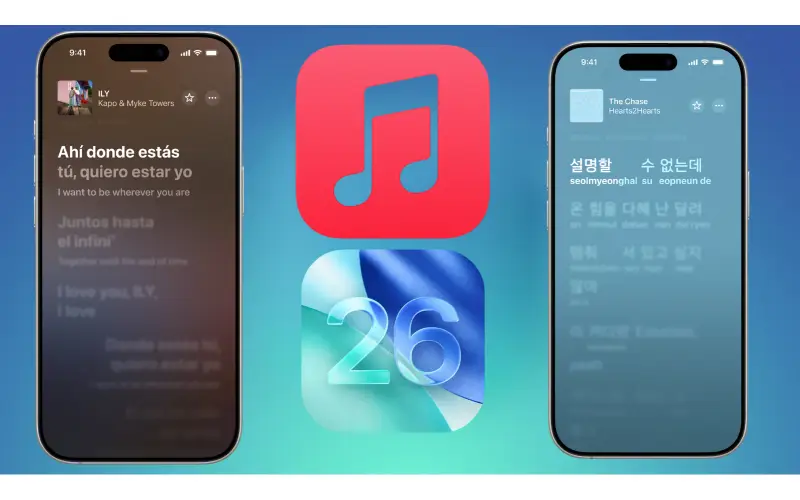
Music is a global language, but lyrics often aren’t. Apple is addressing this with two new features: Lyric Translation and Lyric Pronunciation.
-
Lyric Translation: For songs in foreign languages, Apple Music can now display a side-by-side translation in real time. You’ll see the original lyrics alongside the translated text, allowing listeners to connect more deeply with music beyond their native tongue.
-
Lyric Pronunciation: Going one step further, Apple Music offers phonetic guides so users can sing along—perfect for karaoke or casual fans who want to learn songs in other languages.
Together, these tools expand Apple Music’s utility for cultural exchange. They also strengthen Apple Music Sing, the company’s karaoke feature introduced in earlier iOS releases. With translation and pronunciation guides, karaoke night no longer stops at language borders.
New Ways to Organize Your Library
Apple knows that as users build larger music libraries, organization becomes essential. iOS 26 brings several quality-of-life improvements:
-
Pinned Favorites
-
You can now pin up to six playlists, albums, songs, or artists to the top of your Apple Music library. For those with sprawling collections, this makes your go-to content instantly accessible.
-
-
Playlist Folders
-
Previously only available on Mac, Playlist Folders are finally coming to iOS. Now, you can group playlists into folders—perfect for separating workout playlists from road-trip mixes, or keeping your curated DJ sets apart from your classical collections.
-
-
Home Screen Widgets
-
Apple has introduced new Apple Music widgets for iOS 26.
-
Medium and large pinned-content widgets keep your favorites on the Home Screen.
-
A new large Live Radio widget makes it easier to jump into radio streams without opening the app.
-
Visual Enhancements: Liquid Glass and Animated Artwork
Apple Music, like the rest of iOS 26, adopts the Liquid Glass redesign. This aesthetic emphasizes depth, translucency, and fluid animations, making the entire app feel more modern and dynamic.
The update also brings animated Lock Screen artwork. When music is playing, the Now Playing widget can display full-screen, animated visuals tied to the album art or live artwork provided by Apple. This transforms the iPhone’s Lock Screen into a mini visualizer, creating a more immersive listening experience.
Karaoke Goes Next-Level: iPhone as a Microphone
Apple is bridging devices in a clever way: with iOS 26 and tvOS 26, your iPhone can now double as a wireless microphone for karaoke sessions on Apple TV.
Using Apple Music Sing, participants can:
-
Sing directly into their iPhones, with vocals amplified through the Apple TV.
-
Queue up songs collaboratively.
-
Send emoji reactions in real time.
This integration makes karaoke nights far more accessible, removing the need for third-party microphones. It also builds on Apple’s strategy of weaving the iPhone deeper into the home entertainment experience.
How to Update to iOS 26
If you’re eager to try AutoMix, Lyric Translation, and all of iOS 26’s new features, updating your iPhone is straightforward.
-
Back Up Your Device
-
Use iCloud or connect your iPhone to a Mac/PC to create a backup. This ensures your data is safe in case anything goes wrong.
-
-
Check Compatibility
-
Navigate to Settings > General > About to confirm your device model.
-
-
Install iOS 26
-
Go to Settings > General > Software Update.
-
Tap Download and Install.
-
Follow the on-screen prompts.
-
The update may take anywhere from 15 minutes to an hour depending on your device and internet speed.
Which iPhones Support iOS 26?
Apple typically supports iPhones for five to six years after launch. With iOS 26, the following devices are compatible:
-
iPhone 15 series (all models)
-
iPhone 14 series
-
iPhone 13 series
-
iPhone 12 series
-
iPhone 11 series
-
iPhone XS, XS Max, XR
-
iPhone SE (2nd generation and later)
Older devices, such as the iPhone X and iPhone 8, are no longer supported as of iOS 26.
Apple Music in the Bigger Picture
Apple’s changes to Apple Music in iOS 26 are more than cosmetic—they reflect broader industry trends:
-
Personalization: AutoMix turns static playlists into dynamic listening sessions.
-
Globalization: Lyric Translation and Pronunciation make Apple Music more appealing to international audiences.
-
Interactivity: Karaoke microphone support and animated Lock Screen visuals invite users to participate in music, not just consume it.
-
Organization: Pinned Favorites and Playlist Folders address long-standing user requests for better library management.
For Apple, these features also help Apple Music stand apart in an increasingly competitive field. With Spotify rolling out lossless audio (finally), Tidal pushing hi-res streaming, and Qobuz expanding globally, Apple’s differentiator is experience. iOS 26 positions Apple Music as not just a library, but a stage, classroom, and DJ booth all in one.
Final Thoughts
The release of iOS 26 marks a milestone for Apple Music. Features like AutoMix and Lyric Translation fundamentally change how people interact with their music—whether that’s keeping the vibe alive during a workout, understanding the story behind a song, or belting out foreign-language hits at karaoke night.
As Apple continues to refine these tools and build on the Liquid Glass redesign, it’s clear that Apple Music is evolving into more than just a streaming service. It’s becoming an ecosystem where music, visuals, interactivity, and global accessibility converge.
For iPhone owners, updating to iOS 26 is a no-brainer. With expanded personalization, better organization, and immersive new visuals, Apple Music feels like a fresh experience—one that reaffirms Apple’s place at the center of digital music innovation.